JavaScript, We’ve Got to Talk.

I’ve been working at Jewelbots for the past year and a half, and my work has revolved around three main areas, our mobile companion app for the Jewelbot, the firmware for the Jewelbot, and the backend systems that span the two.

For the mobile app, I chose Ionic.  There were multiple reasons behind this, not the least of which is that it’s far cheaper and easier to develop one app in JavaScript than it is two develop two native applications, and I have never developed either a native iOS application or an Android application.

So Ionic it was.  I built out the underpinnings of the app, turned it over to our resident amazing designer (seriously, Vico is top notch), and began to work on the firmware.

And that was it, until I decided to come back to the app after 8 months of not touching it.  I tried to run the app:

grunt serve

and immediately saw:

Error: cannot find module 'osenv'

great. So after a quick Googling revealed my nodeJS environment was screwed up (remember: I haven’t touched anything since January, except to install minor updates to Mac OSX (Yosemite), I decided to uninstall node and reinstall it using Homebrew using:

brew install node4-lts

I didn’t use node 5 because at the time we were avoiding it due to breaking changes with Node5 and Ionic.

So I decided to do what any software developer would do. Ininstall and reinstall. During the uninstall/reinstall a different way cycle, I also fell prey to this npm bug, that added a few hours onto my work.

So after Node was deleted and installed again (this time from their website, not homebrew), I cd’d into my mobile app folder and ran:

npm install

Since we’re using npm-shrinkwrap, I fully expected everything to work. After all, it’s a fresh installation of node, a fresh installation of npm, and everything is shrinkwrapped and tied to specific versions. Right?

Wrong.

If you were around for the great left-pad debacle, you’re probably aware that before March of 2016, npm had no process of dealing with modules that were unpublished. They were just gone, and you were in trouble if you depended on them.  This was one of those cases, specifically with a module named “i”:

NOTE: 0.3.2 was accidentally unpublished from the server and npm doesn’t allow me to publish it back. Please upgrade to 0.3.3 (source)

Now even after dumping the dependency tree using npm ls (both global and local), I couldn’t find where i was being used, so I started a bisect approach, where I’d remove half the npm modules from the package.json and see if that caused it to work or fail.

After a little searching, I found out it is a dependency of a few things I used, but the one that turned out to be relevant was Ionic 1.3.
But I wasn’t using Ionic 1.3, I had Ionic 1.7.16 installed.  I verified that with

ionic -v

So what was going on?

It turns out, the answer was in my tooling.  I had installed the ionic-generator for yo, and the generator’s Gruntfile.js expected both ionic and cordova (and a few other packages) to be available in the local package folder. I could see this by opening up the Gruntfile and trying to see where it was looking for packages:

var cmd = path.resolve('./node_modules/cordova/bin', exec);

and

var script = path.resolve('./node_modules/ionic/bin/', 'ionic');

Of course, I had installed ionic locally to rid myself of this error (I didn’t understand the generator’s tooling at the time, and just wanted to get running), and later on as they diverged, it caused this issue for me.

So how do you fix it?

Well, I first thought that I should just tell grunt to look at the global locations for cordova and ionic, since their documentation states they should be installed globally.  Turns out that’s not easy to do in a platform-independent way.  I assume (coming from Python) that there are virtualenvs that make this whole process easier; but I can’t get a straight answer which one should be used or why.

After a little while of Googling, I found two ways to fix the issue. The first:

npm link <package>

causes npm to reference the global package as if it’s installed locally. It’s a symlink from the local install location to the global install location.

The second is to use resolve-up. It provides a way to use globs to search global install paths for a package.

This was all my fault. I did the following things wrong:

  • I didn’t understand the generator tooling enough to realize installing the same package globally and locally would cause an issue later on.
  • I didn’t realize that for node, a user running a command and a script running a command are executed in different contexts (even though I should have, right?) I may have the global ionic-cli when I type ionic, but my Gruntfile doesn’t; it doesn’t get the benefit of my PATH (why doesn’t it?)
  • I also didn’t realize that if you want to be absolutely certain the ground doesn’t shift beneath you, you should not only not have the same package installed globally and locally, but you should make sure you’re either using npm-shrinkwrap, or have your package.json pinned to specific versions, and hope they’re never un-published.

As a developer, I know intrinsically that this is all my fault. As a user, I have to ask why we don’t hold our tools to the same standard we hold other software?

Why doesn’t node or npm know you have the same package installed globally and locally, and warn you about it? Why doesn’t it it say, “Hey, instead of installing this locally, why don’t I link you to it?”  Or, why doesn’t node install with a virtualenvwrapper? Why isn’t that the default method for working with node modules?  If there is guidance from npm that all packages should be installed locally, but guidance from makers of CLIs that they should be installed globally; why hasn’t a third-way been worked out? Or is npm that third way?  Why don’t those CLIs (when creating a new project) automatically npm link themselves?

Most of all, why do beginners have to be experts on dependency management in order to get a project up and running?

I love the idea of npm, and I love the passion around the community. But there are certain things that should work out of the box, and dependencies are one of them.


Unboxing the PocketCHIP

One year ago, I backed The CHIP, the world’s first $9 computer. It arrived one month past its original ship date, which is impressive for a Kickstarter campaign.

Since this was the first consumer hardware project I’ve received a reward for, I was unsure as to what it’d look like when it arrived.

It arrived in an simple envelope:

unnamed11

with good box art inside:

unnamed10

From a production perspective, I wonder if the two-color box is cheaper to manufacture? It gives the box a retro-80s feel, which is a nice touch.  Here are the other sides of the box:

Special attention to the directions on the back:

unnamed8

Simple directions and it negates the need for an instruction booklet inside.

Opening up the box, a simple foldable cardboard wrapper held the PocketCHIP:

unnamed5

Opening the sticker-adhered flap produced my first look at the Pocket CHIP itself:

unnamed4

static adhesive covering for the LCD; but otherwise no frills. No USB, no note, nothing.

From a production perspective, the fewer parts, the more it reduces assembly costs and time for packaging, making it cheaper. An economical idea for a company running a Kickstarter.

From a consumer perspective, this is exactly what I’d expect from a Kickstarter delivered product.  It’s easy to be spoiled by glossy boxes or specially wrapped and adhered USB cables, but at the end of the day I’d rather have a launched Kickstarter than a high-finish package.

The CHIP team did a good job of balancing first impressions with physical cost constraints.

Holding the CHIP in my hand was… different than I expected it would be:

It is a Pocket item in name only; but has a nice translucent (plastic? poly something or other?) backing that makes it durable.  The angled back also makes it easier to hold in one hand — if you have large hands (Sorry, Donald).

The Pocket CHIP includes the CHIP itself (second image, above), a battery, an LCD, a keyboard, and a unibody case that holds everything together.  It hosts Debian 8; a custom OS UI, and a touchscreen.

Looking at the device, there are a few reasons why this case is extra special.  They put breakout pins for all the exposed pins; and they’ve even included the communication buses (I2C, SPI, UART) in case you want to include a peripheral.  I have a SPI LED Driver evaluation board sitting next to mine, so I may have to give that a try.

Turning on the PocketCHIP boots up the custom OS; a Debian Linux distro with a custom UI:

unnamed1

(after the tour, that is)

Image-2

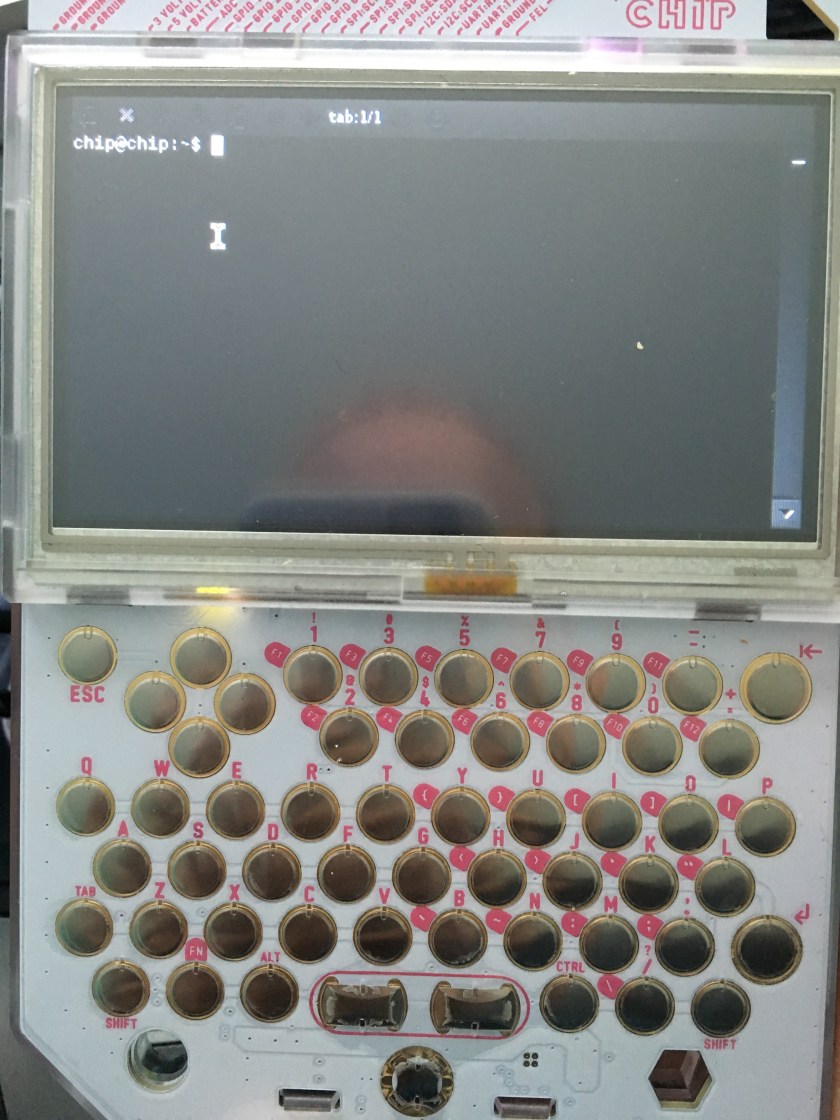
Pico-8 is a retro gaming platform that lets you write games in Lua.  You can also do normal Linux-y things, like drop down into the terminal:

Image-1

or even browse files:

Image

Out of the box, it was worth more than the $50 I paid for it; and I’m a bit surprised it’s selling for that low.  I would have expected the PocketCHIP to cost around $75 or so. Either way, it’s a great way to get a computer in your hand.

Next up for me is to program a demo that uses the full screen, and not just the 128×128 pixels given by the Pico-8 platform.

Quiz: Do you have a Remote Work Culture?

Just like 2016 will be the year of the Linux desktop, it’ll also be the year of the remote worker.

Only one of those sentences is true. Sorry, Linux.

I’ve talked about my experiences with remote working before, but I’ve never put down the criteria that differentiates a company that has remote workers with a company that has a remote work culture.    So here’s a quiz for you; tally your scores up, and we’ll talk about the results at the bottom.

3: this applies and in practice works 80% of the time or better
2: this applies contextually; and generally between 50-80% of the time
1: this applies less than half the time, if at all.


  1. Your office has the capability to host remote workers through video conferencing software or chat software.
  2. All policies regarding remote work, holidays, and ‘flex’ time are written down and accessible to all employees, even if they’re remote.
  3. Important information is disseminated in such a way that people who aren’t present won’t miss out: company persistent chat (like Slack or Hipchat), or email.
  4. Decision makers make an effort to wait to disseminate information until remote workers can video-conference in.
  5. Your office has persistent video conferencing software set up in your office; or your conference rooms contain a web cam and persistent video conferencing addresses (a dedicated Google Hangout)
  6. Remote workers are promoted or given raises at the same rate as in-office workers.
  7. You have a promotion plan in place for remote workers.
  8. You don’t ask remote workers to relocate to the main office.
  9. “Work/Life Balance” applies to everyone in your company, not just people you see day-to-day.
  10. Remote workers consistently say they feel “a part of” the company culture in feedback sessions.
  11. You have regular feedback sessions with all your employees, including your remote workers (1 on 1s, virtual coffee, etc).
  12. Meetings are always scheduled in advance. Impromptu meetings are rare.
  13. Remote workers know the hours of time per day they should be immediately available, and the hours they should be available within 15 minutes of contact.
  14. When there is a special event at the office, you also send something to your remote workers so they don’t feel left out (cake for the cake gods).
  15. If your remote workers came to you with an office culture issue; you’d take their issue seriously and work with them to resolve it, even if it meant changing company practices.
  16. “In office” employees consistently say they feel connected to remote workers; and there aren’t signs of a rift between the two groups
  17. At least once per month, remote workers pair program or work alongside their office counterparts on the same project together, at the same time (probably utilizing some sort of screen sharing software).

40+: You’re doing really well. Your remote culture is solid; and while there are things to work on, you’re in a good place.

25-39: You’ve got some work to do. Your remote workers may feel disconnected, or they may feel like they’re missing vital information.  Your office workers may also feel disconnected from your remote staff. Take a step back and have honest conversations with all parties. Remote work may not be for you, or you may need to double down on it.

<25: You don’t actually have remote employees, right?  If you do, they’re probably experiencing serious issues; and need your help to make them right. You may also have higher than standard turnover with your remote employees.


Special thanks to Brent Ozar (twitterblog) for reviewing this post.

What are some Alternatives to Parse?

Back when I was figuring out which MBaaS to use to power Jewelbots app backend a few months ago, I chose Parse.  Luckily, I included an entire write-up on all the MBaaS (Mobile Backend as a Service) providers I could find at the time.

Since listing the dead ones would be not useful, I’ll list only the ones that are “Alive”, plus new ones I’ve found.

I’m limiting my search to companies that provide a MBaaS and host it for you.

Provider Focus Cost/Month (startup) Status
AnyPresence Unclear Not Provided. Contact wall Alive
App42 Startup MBaaS + Managed Analytics $0-$99 Alive
Appcelerator Cloud MBaaS + App Platform SDK $39-$259 Alive
Apstrata Indie MBaaS <$800/month for Startup ($.08 per user) Alive
Buddy Enterprise MBaaS (unknown, they hide the service behind a “ContactWall”) Unknown (call for demo/pricing) Alive
Cloud Mine Enterprise MBaaS ContactWall (Call for pricing/demo) Alive
Feed Henry Enterprise MBaaS Unknown (ContactWall) Alive (Acquired by Redhat in Late 2014)
Firebase Startup MBaaS $0-$49 Alive
IKnode MBaaS $9/month Alive? – Last commit to their Repo June 2015.
Kii Enterprise MBaaS? (Unclear from their site) ContactWall – Call for Pricing/Demo Alive
Kinto Startup/Open Source MBaaS Free Alive
Kinvey Enterprise MBaaS $2000/month (Free for Startups) Alive
Kumulos Startup MBaaS $10/month based on “fair usage” (not defined) Alive
Windows Azure Mobile MBaaS Totally confusing Alive

Since we were always just using Parse for development, we’ll be moving our infrastructure to AWS; and will likely at least document (if not open source it) when it’s done.